Complete Hospital Management System for Hospitals & Clinics
Run OPD, IPD, billing, pharmacy, laboratory and patient records on one white-label platform. Built for healthcare groups that answer to more than one regulator.
Compliant Wherever Your Hospital Operates
Six regulatory frameworks, one platform build. Your deployment is then configured for the rules that apply in your market.
Hospital Management Software Built for Multi-Region Groups
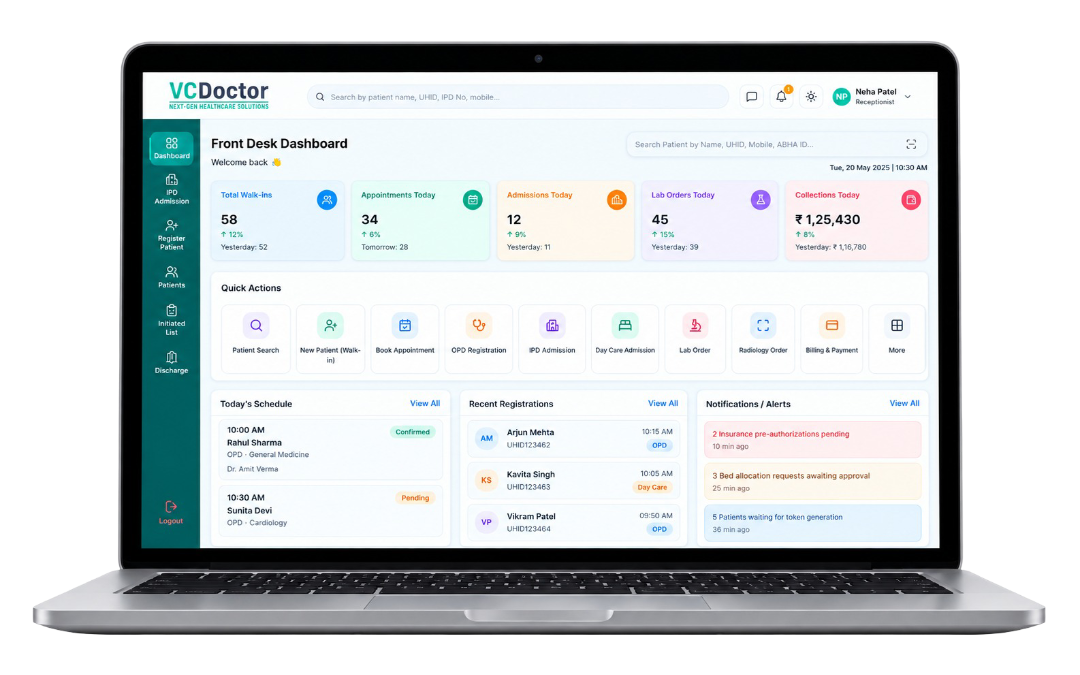
VCDoctor is a white-label hospital management system for hospitals, clinics, diagnostic labs and multi-branch groups. Registration, clinical care, diagnostics and pharmacy, as well as revenue, run on one shared database. As a result, every department works from the same patient record.
You will also see it called a hospital information management system (HIMS) or hospital information system (HIS). Some buyers call it healthcare management software. It fits a wide range of facilities, including multi-specialty hospitals, multi-branch groups, clinics, diagnostic labs, imaging centres, nursing homes, government hospitals and healthtech startups. The platform ships under your own brand, whether on cloud, private cloud or on-premise.
25 Hospital Management System Modules
From registration to discharge, grouped by the five areas your hospital budgets and staffs separately.

Patient Registration
Register each patient once with a unique health ID before their first visit. Their details, insurance and consent are saved, while the system blocks duplicate records.

Appointment Scheduling
Patients book online or at the desk and get SMS reminders before their visit. Doctor and room availability then update for all staff at once.

OPD Management Software
Manage outpatient queues and doctor notes, as well as same-day bills. When the doctor orders tests or medicines, they go straight to the lab and pharmacy.

Front Desk & Token Queue
Reception sees who is waiting and, at the same time, which doctors and rooms are free. Token numbers also keep the waiting area organised.

Mobile Apps & Patient Portal
Patients view reports and pay bills either on the web or on Android and iOS apps. In either case, everything carries your hospital’s name and logo.

EMR & EHR
Keep vitals and diagnoses, as well as notes and documents, in one patient record. Doctors see the full patient history whenever they open it.

IPD Management System
Manage admissions, beds, ward transfers and daily care notes until the patient is discharged. Every service given during the stay is added to the bill automatically.

Emergency & Casualty
Register emergency patients fast, even if only the basic details are known. The full record is then completed once treatment has started.

Operation Theatre (OT)
Schedule surgeries, assign the surgical team and record consent forms before the procedure. Theatre bookings and supplies used also stay linked to the patient.

Nursing Station
Nurses record vitals, tasks and medicines given at the bedside on a tablet instead of paper charts. When a shift ends, unfinished tasks pass to the next team automatically.

Laboratory Information System (LIS)
Track every test from order to sample until the final result is released. Lab machines send results straight into the system, so doctors see them instantly.

Radiology (RIS) & PACS
Manage X-ray and scan orders, as well as reports, in one place. Doctors then view the images inside the patient record.

Pharmacy Management System
Track medicine stock by batch and expiry date, so nothing expires on the shelf. Medicines are issued against the doctor’s digital prescription and then added to the bill.

Blood Bank
Keep records of donors, blood units and transfusions by blood group and expiry date. As a result, every unit can be traced from donor to patient.

Hospital Inventory Management Software
When departments request supplies, the system raises purchase orders. Low-stock alerts warn the store before items run out.

Hospital Billing Software
Bill outpatient, inpatient and emergency services for every payment type. Cash, insurance and package charges appear on one bill instead of three.

Insurance & TPA Claims
Check insurance cover, get pre-approval and then submit cashless claims from the system. Claim documents come straight from the patient record, so nothing is typed twice.

Health Packages
Create fixed-price packages for health check-ups and surgeries, as well as for corporate clients. The system bills what is included, while extras are charged separately.

Consultant Payouts
Calculate each doctor’s share from the visits and services they deliver. Payout statements are therefore ready without manual spreadsheets.

Accounts & Cost Centre
Record receipts and expenses for your finance team. You also see how much each department earns and spends.

HR, Roster & Payroll
Manage staff shifts, biometric attendance, leave and salaries. Attendance flows into payroll automatically, so salaries match actual shifts.

Assets & Equipment
Track every piece of hospital equipment, including its value and service schedule. Maintenance dates and breakdowns are also logged for each item.

Ambulance & Fleet
See which ambulances are free, on a call or under repair. Manage dispatch as well as driver shifts from one screen.

MIS & Analytics
Dashboards show bed occupancy, revenue and patient numbers for each role. In addition, reports reach management by email on a set schedule.

Security & Audit Logs
Control who can see and change each part of the system. Every record viewed or edited is logged with the user’s name, so access stays accountable.
Ready to Manage Your Hospital on One Connected Platform?
Bring OPD, IPD, billing, pharmacy, lab, EMR, and more into one integrated system. See how VCDoctor can be configured for your hospital during a personalized demo.
What Each Role Sees When They Log In
Adoption fails when staff get a screen built for someone else. Instead, every role opens to their own work, on the same live record.
Register, book, collect
 Search or create patient in one field
-
Book, reschedule and issue tokens
-
Live room and doctor availability
-
Take OPD payment at the counter

Full history, one screen
-
Patient timeline with past visits & vitals
-
Lab and radiology results inline
-
E-prescribe straight to pharmacy
-
Start a video consult from the record
Bedside, on tablet
-
Ward task list by shift
-
Record vitals at the bedside
-
Medication administration against orders
-
Raise ward indents for supplies
Orders in, results out
-
Test worklist with sample tracking
-
Analyser results post automatically
-
Dispense against digital prescription
-
Batch and expiry enforced at issue
Nothing billed from memory
-
Charges already posted from every department
-
Package, insurance and self-pay in one bill
-
Pre-authorisation and claim files ready
-
Outstanding and due alerts by patient
Numbers without an export
-
Live bed occupancy by ward
-
Daily collections and outstanding
-
Department and consultant performance
-
Scheduled reports to your inbox
Your brand, their pocket
-
Book and reschedule appointments
-
Download reports and prescriptions
-
Pay bills online
-
Join video consultations
Control without tickets
-
Create roles and set permissions
-
Review login and activity audit trails
-
Configure masters, tariffs and departments
-
Manage integrations and data exports
Where Your Data Lives, and Who Owns It
Health data rarely travels freely across borders. Where your records sit, and what format they leave in, are both compliance decisions.
Cloud Hosting
Go live quickly with VCDoctor hosting. We manage server hosting, backups, and updates, so it is ideal for growing clinics and hospitals.
Private Cloud or On-Premise
Run VCDoctor on either your own servers or a private cloud. In this case, your IT team maintains control over system management, data, and infrastructure.
White-Label Platform
Add your hospital’s name, logo, and colours to the web portal and patient apps so that the experience stays consistently branded.
Hosting Aligned to Your Region
Store patient data in the required region on secure AWS servers in order to meet local storage and compliance requirements.
Security at Every Layer
Protect patient data with encryption and access logs. Share medical records only with patient consent, so information exchange stays secure.
Standards, Not Lock-In
Connect with other systems through HL7 and FHIR, as well as DICOM standards. Keep ownership of your data and export it whenever needed.
Live in Five Phases, Without Stopping the Hospital
Departments go live in sequence, so patient care never waits on a software cutover. Your existing records move across in phase three, verified before anything goes final.
Discovery & Mapping
To begin with, we meet with your department heads and document how registration, admission, diagnostics, dispensing and billing work today. Workarounds and exceptions are also recorded.
Configuration & Branding
After that, departments, wards, service masters, tariffs, payer rules and user roles are configured for your hospital. At the same time, your branding is applied across the portal and apps.
Integration & Migration
During this phase, analysers, PACS and gateways are connected. Legacy records are checked, duplicates are merged and data is migrated, while both systems run together for review.
Role-Based Training
Each team, including front desk, nursing, lab, pharmacy, billing and administration, trains on its own screens. Department champions train first, so support stays in-house.
Phased Go-Live
Core departments switch first, while remaining teams follow the agreed schedule. Meanwhile, technical support and compliance monitoring continue throughout the rollout.
Built for Hospitals That Answer to More Than One Regulator
Plenty of vendors sell hospital software. However, fewer are engineered for a group running facilities across India, the Gulf, the UK and the US.

Multi-Region Compliance in One Platform
HIPAA, ABDM, NABIDH, DHA, GDPR and DPDP handled in the same build. No separate country editions, no separate bills.
White-Label by Default
Over 50 white-label products deployed. The platform ships under your brand across the portal and both apps.
ABDM and NHA Ready
ABHA linking, HFR and HPR registration are not custom projects but supported paths on an NHA Approved platform.
Telehealth and Monitoring Inside the Same Record
Video consultation and remote patient monitoring run on your OPD record instead of a bolt-on. Over 10,000 consultations delivered for 500+ professionals.
Support That Does Not Stop at Launch
Technical support runs 24/7, together with continuous compliance monitoring and proactive NHA guideline updates.
Engineered In-House
We build and maintain the platform ourselves, so a workflow your hospital needs can be scoped and added.
Reviewed and Rated in Public
A 4.9 Play Store rating, as well as listings on GoodFirms, SoftwareSuggest and TrustRadius. Read a published case study before you talk to sales.
Need Help Choosing the Right Hospital Management System?
Share your hospital’s departments, current software, and requirements. Our experts then recommend the right modules, integrations, and implementation approach for your hospital.