How to Choose the Right Hospital Management Software for Your Hospital (Complete Guide 2026)
Running a hospital with disconnected systems gets expensive fast.
Staff enters the same patient data multiple times. Lab results get delayed. Billing misses charges. Managers wait for reports. And spreadsheets quietly become part of the daily workflow.
The right Hospital Management Software brings these processes together in one connected system. Registration, OPD, IPD, pharmacy, lab, billing, inventory, and patient records can work from the same data.
But choosing the right platform is not about picking the vendor with the longest feature list. It is about finding software that fits your workflows, meets your compliance needs, integrates with your existing systems, and can grow with your hospital.
In this guide, you will learn what features to prioritize, how to compare vendors, what questions to ask during demos, how to evaluate costs and security, and how to avoid common buying mistakes.
By the end, you will have a clear framework for choosing Hospital Management Software with confidence.
What Does Hospital Management Software Do?
Hospital Management Software connects your hospital’s key operations in one system, from patient registration and consultation to lab, pharmacy, admission, and billing. It replaces disconnected tools, separate databases, and spreadsheets with one shared platform, helping departments work faster, reduce duplicate data entry, and maintain a complete patient record.
HMS, HIS, HIMS, EMR and Healthcare ERP: What the Names Mean
Vendors use these terms loosely, and that vagueness costs buyers money. The table below sorts them out so you can read any proposal accurately. If you want the clinical record side explained properly, our breakdown of EMR vs EHR covers it in depth.
| Term | What it covers | Where buyers get confused |
|---|---|---|
| HMS / Hospital Software | Full hospital operations from registration to billing | Often sold with only OPD and billing switched on |
| HIS / HIMS Software | The same scope, phrased for information flow | Treated as a different product when it is the same category |
| EMR | Clinical record inside one practice | Sold as a full hospital platform when it is one module |
| EHR | Clinical record shared across providers | Confused with EMR, though sharing is the whole point |
| Healthcare ERP | Finance, inventory, HR, and assets layer | Bought separately when a Hospital Management Solution already includes it |
10 Essential Hospital Management Software Features
Every hospital needs different modules, but these 10 features form the core of an effective Hospital Management Software system. Focus on the features your staff use every day and make sure they work together seamlessly.
| Hospital type | Switch on first | Add in phase two |
| Under 50 beds | Patient registration & EMR, appointments, OPD & IPD, pharmacy, billing | Laboratory, inventory, nursing, reports & dashboards |
| 50 to 200 beds | Patient registration & EMR, appointments, OPD & IPD, laboratory, pharmacy, billing | Inventory, nursing, insurance, security, reports & dashboards |
| Multi-branch group | Patient registration & EMR, OPD & IPD, role-based access, billing, reports & dashboards | Laboratory, pharmacy, inventory, insurance, patient portal |
| Diagnostic or day-care | Patient registration & EMR, appointments, laboratory, billing, reports & dashboards | Pharmacy, inventory, nursing, role-based access |
| Insurance-heavy | Patient registration & EMR, OPD & IPD, billing & insurance, pharmacy, role-based access | Laboratory, inventory, reports & dashboards, nursing, appointments |
Let’s understand each feature in detail.
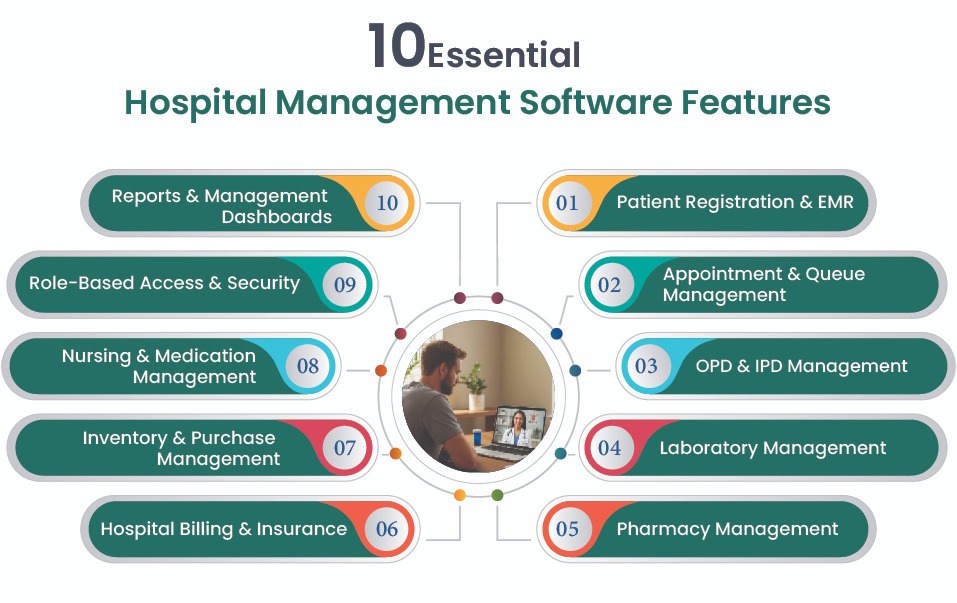
1. Patient Registration & EMR
Your system should create one unique patient record and carry it across every department. Look for duplicate detection, medical history, clinical notes, prescriptions, and easy access to past records.
2. Appointment & Queue Management
Make it easy to manage online bookings, walk-ins, reminders, rescheduling, tokens, and live queues. A good system should reduce waiting times without adding more work for reception staff.
3. OPD & IPD Management
The software should support the complete patient journey, from consultation and admission to bed allocation, ward transfers, and discharge. Every step should update the same patient record.
4. Laboratory Management
Look for end-to-end lab workflows covering test orders, sample collection, barcoding, analyser integration, result validation, and report delivery. This reduces manual entry and speeds up reporting.
5. Pharmacy Management
Prescriptions should flow directly to pharmacies without re-entry. The system should also track stock, batches, expiry dates, dispensing, and charges automatically.
6. Hospital Billing & Insurance
Billing should automatically capture charges from different departments and support OPD, IPD, packages, tariffs, corporate rates, and insurance. For insurance-heavy hospitals, TPA claims and pre-authorisation are equally important.
7. Inventory & Purchase Management
Track medical supplies, department requests, purchases, goods receipts, stock levels, and reorder points from one place. This helps prevent both stockouts and unnecessary purchases.
8. Nursing & Medication Management
Nurses should be able to record vitals, notes, medication administration, and care updates digitally. Bedside documentation reduces duplicate work and keeps clinical information current.
9. Role-Based Access & Security
Different users should have access only to the information they need. Check for role-based permissions, audit logs, encryption, and controls that protect sensitive patient information.
10. Reports & Management Dashboards
Hospital leaders need quick access to revenue, occupancy, outstanding payments, department performance, and other key metrics. Real-time dashboards make it easier to spot problems and make faster decisions.
Ready to Modernize Your Hospital?
Book a free consultation to explore how a modern HIMS can streamline your hospital operations.
Schedule a MeetingHow to Choose Hospital Management Software in 8 Steps
Choosing hospital software does not have to be complicated. Think of it like choosing a new system for your entire hospital. First, understand how your hospital works, then decide what you need, compare the right options, and test the software before you commit.
Step 1: Understand How Your Hospital Works Today
Before talking to vendors, look at how work actually happens in your hospital. Follow one patient from registration to consultation, lab, pharmacy, and billing. Note where staff enter the same information twice, use spreadsheets, or have to move between different systems.
Step 2: Decide What You Need First
Not every feature needs to be switched on from day one. Make two lists: features your hospital needs immediately and features you can add later. Start with essentials such as registration, OPD, billing, pharmacy, and patient records.
Step 3: Know Your Compliance Requirements
Different hospitals follow different healthcare rules. First, identify which ones apply to you, such as HIPAA, ABDM, DPDP, NABH, DHA, or GDPR. Then make sure every vendor on your shortlist can clearly show how its software meets those requirements.
Step 4: Choose Where Your Data Will Be Stored
Now decide whether you want cloud, private cloud, or on-premises deployment. Cloud is usually easier to manage, while private cloud or on-premises may make more sense when you need greater control over your data. Consider your IT team, budget, security needs, and data residency rules.
Step 5: Shortlist 3 to 5 Vendors
Do not compare ten or twenty platforms at once. Pick three to five that meet your basic requirements and give each vendor the same list of needs. This makes it much easier to compare their features, pricing, integrations, and support.
Step 6: Test the Software With a Real Patient Journey
This is where you find out whether the software actually works for your hospital. Give the vendor a real example, such as a patient registering, seeing a doctor, getting a lab test, collecting medicine, and paying the bill. Watch how many steps are involved and whether staff need to enter the same information again.
Step 7: Check Data Migration, Integrations, and Support
Your new system must work with your existing data and equipment. Ask how the vendor will move old patient records and connect systems such as lab analysers, PACS, payment gateways, and other healthcare tools. Also confirm support hours, response times, and who you can contact when something goes wrong.
Step 8: Start With One Department
Do not move your entire hospital to the new system on day one. Start with one department, such as OPD or billing, and run it for a few weeks. This gives your team time to find problems, adjust workflows, and build confidence before you expand the software across the hospital.
Now that you have the process, let us look at the three decisions that shape it most, starting with where your data actually sits.
Read Also: An Ultimate ABDM Integration Checklist for Healthcare Providers
Cloud or On-Premise: Where Should Your Data Live?
This choice affects budget, speed, and compliance together, so compare the three models side by side before committing.
| Model | Who controls it | Setup speed | Cost pattern | Best fit |
|---|---|---|---|---|
| Cloud | Vendor hosts and maintains | Fastest | Recurring subscription | Clinics, growing hospitals, multi-branch groups |
| Private cloud | Shared control, isolated environment | Moderate | Subscription plus infrastructure | Hospitals with data residency rules |
| On-premise | Your IT team owns everything | Slowest | Higher upfront, ongoing internal cost | Government and policy-bound facilities |
Compliance and Security: What Your Software Must Prove
Compliance claims are easy to make and harder to evidence, so learn to ask for proof rather than assurances.
| Framework | Where it applies | What the platform must show |
|---|---|---|
| HIPAA | United States | Encryption, access controls, audit logs, breach process |
| ABDM and DPDP | India | ABHA linking, consent management, in-country data storage |
| NABIDH and DHA | Dubai and UAE | Local health information exchange, residency compliance |
| GDPR | Europe | Lawful basis, consent records, data subject rights |
| NABH | India accreditation | Documented clinical records and audit trails |
1. Know Which Rules Apply to Your Hospital
Start by checking which healthcare regulations your hospital must follow. If you operate in multiple countries, you may need different rules for each location. Choosing a platform that supports multiple compliance standards can make management easier and reduce the need for separate systems.
2. Check HL7, FHIR, and DICOM Support
These standards help your hospital software exchange data with other healthcare systems. HL7 and FHIR are mainly used for sharing clinical information, while DICOM is used for medical images. Make sure your software supports these standards so your data can move easily between systems.
3. Check ABDM and ABHA Readiness in India
For Indian hospitals, ABDM readiness means more than simply creating an ABHA ID. The software should support consent management, health record linking, and connections with relevant healthcare registries. Check what ABDM features are actually supported before choosing a vendor.
4. Do Not Skip Basic Security Checks
Ask how the vendor protects patient data. Check for encryption, role-based access, secure login sessions, and detailed audit logs. Also ask how backups are tested and who monitors access to sensitive records.
5. Know Who Owns Your Data
Make sure the contract clearly states that your hospital owns its patient and financial data. You should be able to export your data in standard formats if you ever change vendors. Also check whether the vendor charges an extra fee for data export.
Read Also: Top 10 Best HIPAA-Compliant Telehealth Platforms
How Much Does Hospital Management Software Cost?
Nobody publishes a single price for this category, and any vendor who quotes one without seeing your hospital is guessing. What you can do is understand the structure, so you can read every proposal accurately.
| Cost head | What drives it | One-time or recurring |
|---|---|---|
| Licence or subscription | Bed count, user count, modules enabled | Recurring |
| Implementation | Departments configured, masters, tariffs | One-time |
| Data migration | Volume and quality of legacy records | One-time |
| Integration | Analysers, PACS, payment gateway, registries | One-time, sometimes recurring |
| Training | Number of roles and shifts to cover | One-time, with refreshers |
| Infrastructure | Servers and networking for on-premises | Upfront plus maintenance |
| Support and updates | Response times and coverage hours | Recurring, often annual |
12 Questions to Ask Before You Sign
- Can we configure workflows ourselves? This tells you how much control your team will have without depending on the vendor.
- How do you handle duplicate patient records? A good system should detect and prevent duplicate records before they create problems.
- Which compliance standards can you prove you meet? Make sure the vendor can provide evidence instead of making general compliance claims.
- Who owns our data, and how can we export it? You should have full ownership and be able to access your data if you change vendors.
- How will our existing data be migrated and verified? A clear migration process helps prevent missing, incorrect, or duplicate patient records.
- Which lab analysers and PACS systems do you integrate with? Confirm that the software can connect with the equipment and systems your hospital already uses.
- What is your guaranteed support response time? You need to know how quickly help will arrive when a critical system issue occurs.
- Can we add a new branch without installing a separate system? This shows whether the platform can support your hospital as it grows.
- How are software updates and upgrades delivered? Check whether updates are included and how they will affect your daily operations.
- What exactly is included in staff training? Clear training helps your staff adopt the system faster and reduces mistakes after launch.
- Can we use the software under our own hospital brand? This matters if you want the portal, apps, and patient experience to carry your hospital branding.
- What happens to our data if we decide to leave? Make sure you can export your data in usable formats without unexpected fees or restrictions.
7 Warning Signs You Are Talking to the Wrong Vendor
Watch for these warning signs before signing a contract. Each one can point to bigger problems after implementation.
- The Demo Uses Their Data, Not Yours: A good vendor should be comfortable testing your real workflows. If they only show scripted demos with sample data, you may not see how the software handles your actual processes.
- Compliance Is Claimed but Not Proven: Do not settle for statements like “we are fully compliant.” Ask for evidence of security controls, audit logs, consent management, and the specific standards they support.
- Every Small Change Costs Extra: Ask the vendor to make a simple change, such as adding a tariff or form field. If every adjustment requires a paid request, your team may become dependent on the vendor for basic configuration.
- Migration Has No Clear Plan: Data migration should include data checks, trial migration, testing, and department-level verification. If the vendor simply calls it “easy,” ask for the complete process in writing.
- Your Data Can Only Be Exported in Their Format: Make sure you can export your data in standard formats such as CSV, HL7, or FHIR. Limited export options can make it difficult and expensive to switch vendors later.
- Support Has No Clear Escalation Path: Ask who you can contact when a critical issue occurs outside normal hours. A reliable vendor should provide clear support hours, response times, and an escalation process.
- Pricing Never Becomes a Clear Scope: Do not accept a vague price range. Get the final scope in writing, including modules, integrations, migration, training, support, and all associated costs before signing.
Read Also: 10 Best Healthcare ERP Solution Providers for Businesses
Why Hospitals Choose VCDoctor
VCDoctor gives hospitals a ready-to-use healthcare platform instead of making them build everything from scratch. It brings HIMS, EMR/EHR, telemedicine, patient engagement, billing, and other healthcare workflows into one customizable ecosystem.
It is also built for organizations that want to launch under their own brand. Hospitals can customize the platform with their branding while connecting existing healthcare systems and supporting secure digital care.
What Makes VCDoctor Stand Out?
- All-in-one platform: HIMS, EMR/EHR, telemedicine, RPM, appointments, billing, and patient portals.
- White-label ready: Use your own logo, colors, domain, portal, and apps.
- Healthcare compliance: Supports HIPAA, GDPR, ABDM, DHA, NABIDH, and DPDP requirements.
- Easy integration: Connect with EHRs and other third-party healthcare systems through APIs and FHIR.
- Built for modern care: Add video consultations, e-prescriptions, patient engagement, and remote monitoring.
- Multi-device access: Works across desktops, tablets, and smartphones.
- Ongoing support: Technical support helps keep your platform running smoothly after launch.
Looking for the Right HIMS for Your Hospital?
Let’s discuss your requirements and find a solution that fits your hospital’s workflow.
Contact Us TodayConclusion
Choosing the right Hospital Management Software is about finding a platform that fits your hospital’s real needs, not simply picking the one with the longest feature list.
Start by understanding your workflows, identify your must-have features, check compliance and security, compare a few suitable vendors, and test each platform with real hospital scenarios.
The right system should make everyday work easier, connect departments, reduce manual tasks, protect patient data, and scale as your hospital grows.
Take the time to evaluate your options carefully, and you can choose a Hospital Management Software that delivers value for your staff, patients, and hospital for years to come.
FAQs
This is the platform that runs hospital operations on one shared database. It connects registration, OPD, IPD, laboratory, radiology, pharmacy, billing, and administration, so every department works from the same patient record.
An EMR holds the clinical record, which is one part of the picture. Hospital Management Software includes that record and adds billing, pharmacy, inventory, insurance, staffing, and reporting, so it covers the whole hospital rather than the consultation.
Pricing depends on bed count, user numbers, modules enabled, deployment model, integrations, and migration volume. Ask for a written scope with a fixed quote rather than an open range, and budget separately for training and parallel running.
Timelines vary with hospital size, module scope, and how much legacy data moves across. Rollouts are usually phased, with core departments going live first, so ask for a dated plan before any work begins.
A ready platform is faster, more cost-effective, and already carries compliance and updates. Custom development only makes sense when your workflow is genuinely unique, and no configurable platform can accommodate it, which is rarer than most buyers expect.