
How Integrated Medical Billing Software Streamlines Hospital RCM (2026 Guide)
Every hospital treats hundreds of patients every day. But behind every patient is a bill that must be captured, coded, submitted, and paid.
A single missed charge, coding error, or delayed claim can slow down payments and quietly cost a hospital thousands in lost revenue.
That is where integrated medical billing software makes a difference. It connects registration, clinical care, labs, pharmacy, billing, claims, and payments to one patient record inside your hospital management system.
As a result, charges are captured faster, claims go out with fewer errors, and hospital teams spend less time fixing billing problems.
In this guide, we’ll explain how integrated medical billing software streamlines hospital revenue cycle management, from patient registration and eligibility checks to claims, denials, payments, and final collection.
You’ll also learn the key features, benefits, KPIs, compliance requirements, and AI capabilities to look for when choosing a hospital billing solution.
What Is Integrated Medical Billing Software?
Integrated medical billing software is a billing system built into your hospital’s main software. It connects billing with patient registration, EMR, lab, pharmacy, and other departments using the same patient record and data.
Unlike standalone billing tools, integrated software does not depend on manual data entry or file transfers. When a service is recorded, the charge can be added to the patient’s bill automatically. This reduces delays, duplicate work, and billing errors.
It also supports hospital-specific needs such as advance deposits, IPD interim bills, package pricing, TPA cashless claims, corporate billing, and doctor payouts, all linked to the same patient visit or admission.
Where Hospitals Lose Revenue With Manual or Fragmented Billing
Revenue leakage rarely comes from one big failure. Instead, it builds up through small, repeated gaps across the cycle, such as:
- Registration errors: Misspelled names, wrong policy numbers, and outdated coverage cause rejections before a payer even reviews the care.
- Missed charges: Consumables, bedside procedures, and late lab orders never reach the final bill when departments log services separately.
- Coding mistakes: Incomplete documentation leads to wrong or unspecific codes, which trigger denials or underpayments.
- Slow claim submission: Manual claim preparation delays filing and pushes some claims past payer deadlines.
- Unworked denials: Denied claims sit in queues because nobody owns the follow-up or sees the root cause.
- Payment posting gaps: Manual posting misses underpayments and leaves balances unreconciled for weeks.
- Poor visibility: Leaders spot revenue problems at month-end, long after the money has already slipped away.
How Integrated Medical Billing Software Streamlines the Hospital Revenue Cycle, Stage-by-Stage
Now for the part that matters most. Follow the patient journey below, and you will see how medical billing software removes a manual handoff at each stage of the hospital revenue cycle.
1. Patient Registration and Real-Time Insurance Eligibility Checks
Everything starts at the front desk. When your team registers a patient, the system captures demographics, ID details, and insurance information once, into a single master record that every department reuses.
Next, the software runs an electronic eligibility check with the payer or TPA. Within moments, your staff sees active coverage, co-pay, deductible, and benefit limits, so they can fix problems before the patient reaches the doctor.
2. Pre-Authorization, Cost Estimates and Advance Deposits
For planned admissions and surgeries, the system flags which services need payer approval. It then builds the pre-authorization request from the diagnosis, planned procedure, and estimated cost already sitting in the record.
At the same time, the billing module creates a cost estimate from your tariff or package. Your team collects an advance deposit against that estimate, and the system adjusts that deposit automatically in the final bill.
3. Automatic Charge Capture From Every Department
This is where integrated systems pull clearly ahead. When a nurse gives a drug, the lab releases a result, or the OT logs an implant, the charge posts instantly.
You no longer depend on paper slips or end-of-day entries from each department. The charge master applies the right price, package rule, or payer tariff automatically, so nothing billable gets left behind.
4. Clinical Documentation to Accurate Medical Coding
Once clinicians document care, the system maps diagnoses and procedures to standard code sets such as ICD-10, CPT, and HCPCS. Coders see notes, orders, and results on one screen instead of chasing files across departments.
Built-in edits then check whether the documentation supports the selected codes. If a discharge summary misses a detail, the coder queries the doctor before the claim goes out. A connected EHR system makes this step far more reliable.
5. Claim Scrubbing and Electronic Submission to Payers and TPAs
Before any claim leaves your hospital, the software tests it against payer-specific rules. It catches missing fields, invalid code pairs, mismatched dates, and authorization gaps, then routes each error to the person who can fix it.
Clean claims go out electronically in the format each payer expects. That could be a standard EDI transaction, a TPA portal, or a national claims exchange. Your team then tracks status without calling payers one by one.
6. Denial Management and Faster Appeals
Denials still happen, even with clean data. The difference is that the software reads each denial reason code, groups it by cause, and assigns it to the right owner with a deadline.
Because the full clinical record sits one click away, your staff attaches supporting documents and appeals quickly. That effort pays off, since Premier found that more than 54% of claims initially denied by private payers were eventually paid.
7. Automated Payment Posting and Reconciliation
When payers send remittances, the system reads the electronic remittance advice and posts payments against the right claims automatically. It records adjustments, write-offs, and patient responsibility without anyone keying in numbers.
The system flags any underpayment against your contracted rate straight away. Your finance team then matches bank deposits with posted payments inside the same platform, which keeps the books clean and ready for audit.
8. Discharge Billing, Patient Statements and Collections
At discharge, the final bill is almost ready because charges have been posted all along. Billing staff only review exceptions, apply deposits and concessions, and split the amount across insurer, TPA, employer, and patient.
Patients then receive a clear, itemized statement and pay by card, UPI, wallet, or online portal. Automated reminders follow up on open balances, so collections keep moving without your team chasing every account by phone.
Is Your Hospital Losing Revenue to Disconnected Billing Workflows?
See how VCDoctor’s integrated medical billing solution can connect billing with key hospital workflows for better revenue visibility and efficiency.
Book a Free Demo12 Key Benefits of Integrated Medical Billing Software for Hospitals
Once billing shares a record with care delivery, the gains show up across finance, operations, and the patient experience. Here are the benefits hospitals usually feel first.
1. Fewer Claim Denials and a Higher Clean Claim Rate
When eligibility, authorization, and coding checks happen before submission, far fewer claims bounce back. You spend less time on rework, and more of your claims get paid on the first pass, which is where the real savings sit.
2. Faster Reimbursements and Healthier Cash Flow
Claims go out when the day care ends instead of waiting for manual preparation. Faster submission, fewer rejections, and automated posting shorten your days in accounts receivable, so cash reaches your bank sooner and far more predictably.
3. Complete Charge Capture With No Revenue Leakage
Every drug, consumable, test, and procedure posts from the department that delivered it. You stop losing money to forgotten slips and late entries, which is often the quickest revenue win for busy inpatient units.
4. Better Coding Accuracy
Your coders work with the full clinical picture and automated code edits, not scanned notes. That means fewer unspecific codes, fewer downcoded claims, and payments that finally match the care your doctors delivered.
5. Lower Administrative Workload and Cost to Collect
Automation takes over repetitive work like data entry, eligibility calls, claim status checks, and payment posting. Your billing team handles more volume without extra hires and saves its energy for exceptions that need human judgment.
6. Real-Time Financial Visibility for Leadership
Your CFO no longer waits for month-end spreadsheets to understand revenue. Live dashboards show collections, denials, outstanding balances, and department performance, so you can act on a problem in the same week it starts.
7. Stronger Compliance and Audit Readiness
Built-in coding rules, payer edits, and immutable audit trails keep your billing aligned with current regulations. When an auditor or payer raises a question, you can show exactly who changed what, and when they changed it.
8. Secure Handling of Patient Financial Data
Integrated platforms apply one security model across clinical and financial data. Role-based access, encryption, and multi-factor login mean fewer copies of sensitive records floating around in spreadsheets and email threads.
9. A Clearer, Friendlier Patient Billing Experience
Patients get upfront estimates, itemized bills, and flexible digital payment options. Clear billing cuts disputes and phone calls, and it leaves patients with a far better final impression of your hospital.
10. Scalability Across Multi-Branch Hospital Groups
A single platform applies the same tariffs, payer rules, and reports across every branch. As you add beds, specialties, or locations, you simply configure them instead of buying and connecting yet another billing system.
11. More Clinician Time for Patient Care
Doctors and nurses document once, and billing picks up what it needs automatically. Fewer coding queries and paper forms mean your clinical team spends its time with patients rather than answering billing clerks.
12. Measurable Return on Investment
Every gain above shows up in numbers you can track, from denial rate to cost to collect. That makes it much easier to justify medical billing software to your board and prove its value quarter after quarter.
Now that you have seen what integrated billing can deliver, let’s take a look at the features that make those results possible.
Read Also: Top 12 ABDM Compliant HIMS Software in India
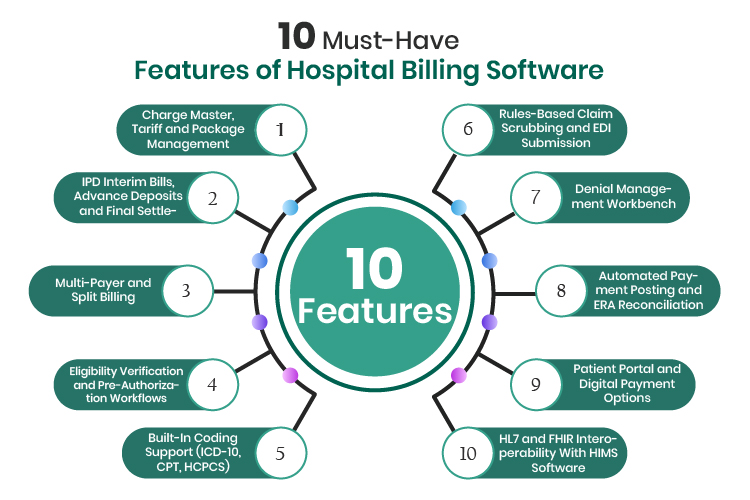
10 Must-Have Features of Hospital Billing Software
Not every system that calls itself integrated can handle hospital-grade billing. Use this list as your baseline whenever you evaluate medical billing software for a multi-department facility.
1. Charge Master, Tariff and Package Management
Your charge master holds every billable service with its price. Good software keeps separate tariffs for self-pay, insurers, employers, and government schemes on one screen. It also manages fixed packages for surgeries and health checks.
2. IPD Interim Bills, Advance Deposits and Final Settlement
Inpatient stays need running bills, not a surprise at discharge. Look for interim billing, deposit tracking, low-balance alerts, and a final settlement workflow that applies deposits, discounts, and approvals automatically.
3. Multi-Payer and Split Billing
One admission can involve an insurer, a TPA, an employer, and the patient. Your system should split a single bill across all of them by rule, while keeping each payer’s claim and the patient’s share cleanly separated.
4. Eligibility Verification and Pre-Authorization Workflows
The software should check coverage electronically and track every pre-authorization from request to approval. Alerts for expiring approvals, or for extensions during long stays, protect you from some of the most avoidable denials.
5. Built-In Coding Support (ICD-10, CPT, HCPCS)
Coding tools should suggest codes from documentation, validate code combinations, and stay current with code set updates. Specialty templates also help doctors document in a way that supports accurate coding from the very start.
6. Rules-Based Claim Scrubbing and EDI Submission
A configurable rules engine should test every claim against payer-specific edits before submission. It also needs to send claims in the formats your payers accept, including standard EDI transactions and TPA or national exchange portals.
7. Denial Management Workbench
Every denial needs an owner, a reason, and a deadline. A dedicated workbench groups denials by cause, payer, and department, tracks each appeal, and shows which fixes actually bring revenue back.
8. Automated Payment Posting and ERA Reconciliation
Electronic remittance files should post automatically against the right claims. The system should also flag underpayments against contracted rates and reconcile deposits with your bank records without manual matching.
9. Patient Portal and Digital Payment Options
Patients now expect to view bills and pay online. Look for online billing that supports cards, UPI, and wallets, sends receipts automatically, and nudges open balances toward closure with timely reminders.
10. HL7 and FHIR Interoperability With HIMS Software
Even inside an integrated platform, you will still connect to labs, PACS, payers, and accounting tools. Support for HL7, FHIR, and standard APIs keeps data moving cleanly between your HIMS software and every external system.
Hospital Revenue Management KPIs Your Billing Software Should Track
Good billing software makes performance measurable from day one. Track these hospital revenue management KPIs every month, by payer and by department, to see exactly where cash slows down.
| KPI | What It Tells You | How Integrated Billing Improves It |
|---|---|---|
| Days in A/R | How long billed services take to turn into cash | Faster submission and automated posting shorten the cycle |
| Clean claim rate | Share of claims that pass edits without correction | Pre-submission scrubbing catches errors early |
| First-pass acceptance rate | Share of claims paid on the first submission | Upfront eligibility and coding checks |
| Initial denial rate | Share of claims payers deny on first review | Root-cause analytics and authorization tracking |
| Net collection rate | How much of the collectible amount you actually collect | Underpayment flags and structured denial recovery |
| Discharged not final billed (DNFB) | Value of discharged cases still waiting for a final bill | Real-time charge capture and coding work queues |
| Charge lag | Days between service delivery and charge posting | Automatic posting from every department |
| Cost to collect | What you spend to collect each unit of revenue | Automation cuts manual effort per claim |
Compare each KPI against your own baseline and payer mix rather than a generic industry figure. The trend over three to six months tells you far more than any single monthly snapshot.
Read Also: ERP System in Healthcare: A Comprehensive Guide
How to Choose the Right Medical Billing Software for Your Hospital
Choosing medical billing software is a multi-year decision that touches every department in your hospital. Follow these seven steps, in order, to build a shortlist you can defend in front of your board.
1. Map Your Revenue Leakage Before You Compare Vendors
Start with your own numbers, not a vendor demo. Pull your top denial reasons, days in A/R, DNFB, and charge lag for the last few months, and note exactly where money gets stuck.
This short list becomes your scorecard. When vendors present, ask them to show how their system fixes your top three leaks, instead of sitting through a generic feature tour.
2. Confirm Billing Runs Natively on Your Hospital Management Software
Next, check whether billing truly shares a database with registration, EMR, lab, pharmacy, and wards. Ask the vendor to post a lab charge live and show it appearing on the patient bill within seconds.
If the answer involves nightly syncs, file exports, or manual uploads, you are looking at a standalone tool with a connector. That setup quietly brings back the same handoffs you are trying to remove from your hospital management software.
3. Check Payer, TPA, and Regional Compliance Coverage
List every payer type you bill, including insurers, TPAs, government schemes, and employers. Then confirm the software supports their claim formats, portals, and pre-authorization rules without custom development work.
Do the same for regulations in every market you serve. A Dubai hospital needs NABIDH and eClaimLink readiness, an Indian group needs ABDM and NHCX support, and a US facility needs HIPAA transactions.
4. Test Claim Scrubbing and Denial Analytics on Real Claims
Ask for a proof of concept that uses a sample of your own denied claims. A strong rules engine should catch most of the errors behind those denials before a claim ever leaves the building.
Then review the denial dashboard closely. You want root causes by payer, department, and code, plus appeal tracking, rather than a flat list of rejected claims.
5. Validate Scalability for Branches, Beds, and Volume
Think about where your hospital will be in five years. Check how the system handles new branches, extra beds, higher claim volumes, and new specialties without slowing down.
Ask for references from hospitals of your size or larger. Their experience with peak loads, month-end closing, and multi-branch reporting tells you more than any brochure can.
6. Review Deployment Options, Data Ownership and Security
Decide whether you need cloud, private cloud, or on-premises deployment, based on data residency rules and your IT capacity. Confirm where the data will physically sit and who can access it.
Also make sure your data stays exportable in standard formats if you ever switch vendors. Check encryption, audit trails, backup policy, and security certifications before you sign anything.
7. Assess Implementation Support and Total Cost of Ownership
Look beyond the licence fee. Add implementation, data migration, training, interfaces, hosting, support, and upgrades to see the true total cost of ownership over three to five years.
Finally, ask how the vendor handles rollout. A phased go-live by department, with parallel runs and dedicated support, protects your cash flow while your teams adjust to the new workflows.
Also Read: AI in Healthcare: Features, Benefits, Use Cases, and Future Trends
Why VCDoctor Is the Right Partner for Integrated Hospital Billing and RCM
VCDoctor runs hospital billing on the same white-label HIMS record as OPD, IPD, lab, pharmacy, and telehealth. Charges post from every department, so your finance team bills from live data instead of paper slips.
- One record, every department: OPD, IPD, emergency, lab, pharmacy, and OT charges post automatically to a single patient account.
- Multi-payer and TPA workflows: Split billing, eligibility checks, pre-authorization, cashless claims, and settlement reconciliation run from one desk.
- Packages and payouts built in: Health packages, tariff plans, advance deposits, and doctor commission payouts calculated without spreadsheets.
- Multi-region compliance: HIPAA, ABDM, NABIDH, DHA, GDPR, and DPDP support sit in the same build, on an NHA-approved, AWS-secured platform.
- Standards, not lock-in: HL7, FHIR and DICOM interoperability, plus finance exports to Tally, SAP or your existing ERP.
- Proven delivery: Engineered by DreamSoft4U with 22+ years in healthcare IT and 50+ white-label products deployed, as the Germaine Health Center case study shows.
- Flexible deployment and support: Cloud, private cloud, or on-premises hosting, a phased go-live, and 24/7 technical support.
Ready to Improve Your Hospital Revenue Cycle?
Explore VCDoctor’s integrated medical billing and HIMS solutions to streamline billing, pharmacy, diagnostics, patient services, and more.
Contact Us TodayConclusion
Hospital revenue rarely disappears in one dramatic failure. It leaks through missed charges, weak coding, slow claims, and unworked denials. Integrated medical billing software closes those gaps by running billing on the same record as patient care.
From registration to final collection, it verifies coverage, captures charges, scrubs claims, and works denials. It also gives your leaders live revenue visibility across every branch and payer.
We hope this guide helped you understand how integrated medical billing software streamlines hospital revenue cycle management and what to check before investing.
Now it’s your turn to audit your own revenue cycle, find your biggest leaks, and fix them at the source. Connect with our experts to map your revenue gaps and see integrated billing running on your own hospital workflows.
FAQs
It is a billing and revenue cycle module that runs inside your hospital’s core platform and shares one patient record with clinical care. Charges, codes, claims, and payments flow automatically, so staff never re-enter them between separate tools.
Hospital billing software handles admissions, interim bills, advance deposits, packages, multi-payer splits, TPA claims, and charges from many departments. Clinic tools usually bill single visits for a few providers and lack these inpatient workflows.
Medical billing software verifies eligibility and authorizations upfront, checks codes against documentation, and scrubs each claim with payer rules before submission. It then analyzes denial reasons, so your team fixes recurring causes instead of repeating appeals.
Yes, most modern platforms connect through HL7, FHIR, and APIs. However, billing that runs natively inside your HIMS delivers better results than a bolted-on connector, because it removes data syncs and duplicate entries completely.
That depends on where you operate. US hospitals need HIPAA and standard claim transactions, while Indian hospitals need ABDM, NHCX, and DPDP alignment. Dubai facilities need NABIDH and eClaimLink, and UK or EU hospitals need GDPR controls.
A single hospital usually goes live within a few months, depending on modules, interfaces, and data quality. Multi-branch groups take longer because they roll out site by site, with parallel runs and role-based staff training.